
Daily tasks
Habits and routines that show up every day.
Free plan forever · 15-day Pro trial
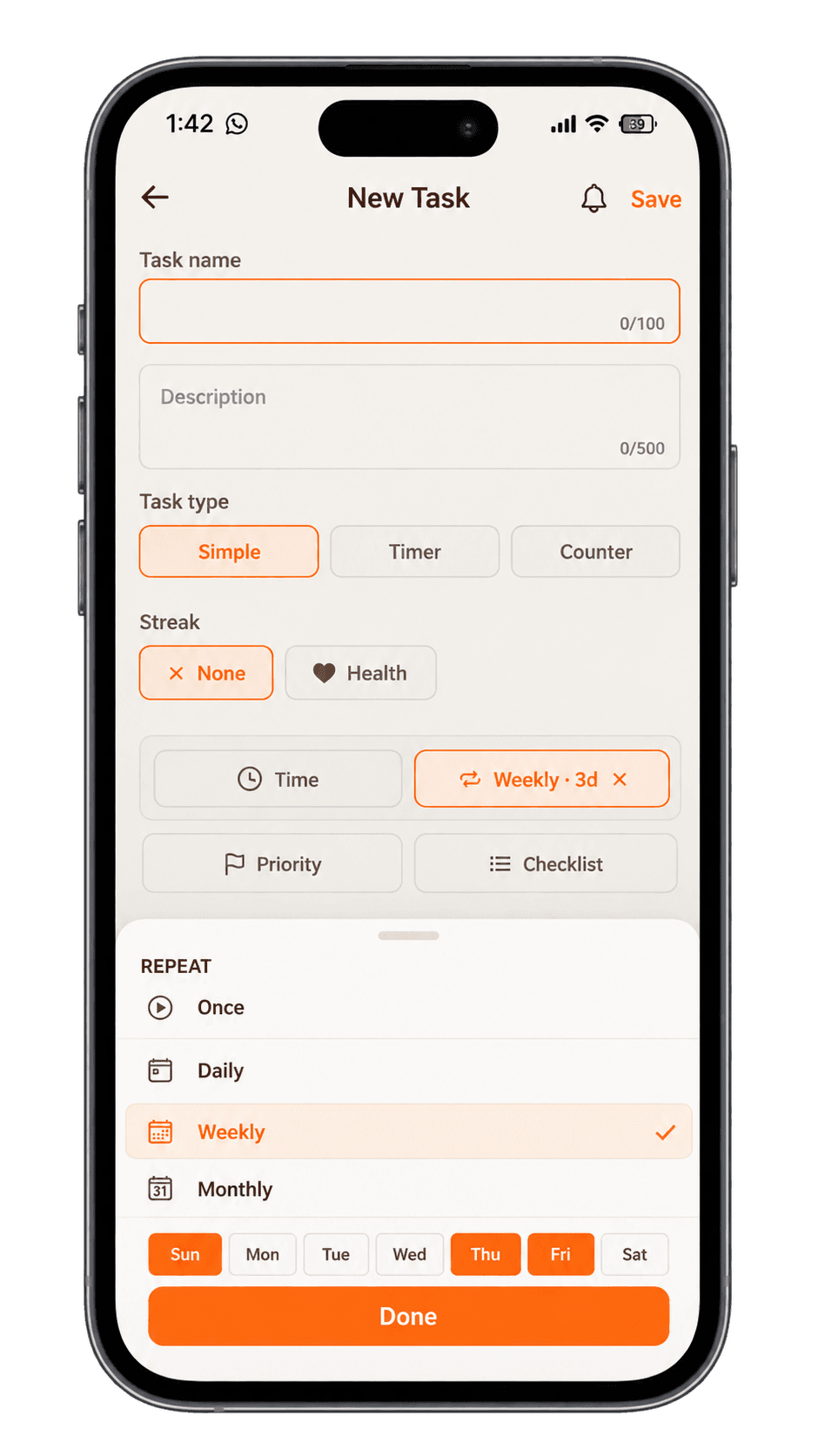
Repeat tasks daily, on the weekdays you choose, or monthly. Add reminders and let streaks track how consistent you are.
No more re-typing the same task every day.
Habits and routines that show up every day.
Pick the exact days of the week a task repeats.
Bills, reviews and anything that comes back each month.
Each repeat can remind you, and every completion builds the streak.
Add the task once with its details, priority and reminder.
Daily, weekly on chosen days, or monthly.
Taskke adds it to the right days automatically, and streaks track each completion.
Drink water, read, review the plan.
Gym on chosen days, weekly report, groceries.
Pay bills, back up files, budget review.
Revision sessions and recurring check-ins.
Quick answers about this feature. Still stuck? Visit the help centre or contact us.
Recurring tasks are tasks that repeat automatically on a defined schedule, such as daily, weekly, or monthly. Instead of recreating the same task each time, you set it up once and it resets on your chosen frequency.
Yes. Taskke supports daily, weekly, and monthly recurring tasks. Once set, a recurring task resets automatically so you never need to recreate it manually.
Taskke's free plan includes up to 4 daily, 2 weekly, and 2 monthly recurring tasks, plus unlimited one-off tasks. Taskke Pro ($2.99/month or $24/year) makes recurring tasks unlimited, and new users get a 15-day free Pro trial.
Yes. You can set any task to repeat every day. Daily recurring tasks are useful for routines like exercise, study, planning, or any responsibility you want to maintain consistently.
Yes. Taskke supports weekly recurring tasks. Use them for responsibilities that come around on a regular weekly schedule — a planning session, a review, or a routine you maintain once a week.
Yes. A weekly recurring task can repeat on exactly the days you choose — for example Sunday, Thursday, and Friday — so routines like gym days or class days don't need a separate task for each day.
Yes. Taskke supports monthly recurring tasks. These are useful for responsibilities that only happen once a month but still need to stay visible — financial reviews, planning sessions, or household responsibilities.
A one-time task is created, completed, and done — it doesn't repeat. A recurring task resets automatically on a schedule, so it appears again after each completion. Use one-time tasks for specific deliverables and deadlines; use recurring tasks for responsibilities that happen on a regular schedule.
Yes. You can add a reminder to any task in Taskke, including recurring ones. The reminder sends a push notification at your chosen time, so the task is brought to your attention when it matters.
Recurring tasks keep regular responsibilities in your task list automatically, making it easier to maintain routines without manual effort. Whether that consistency becomes a long-term habit depends on how you follow through — Taskke provides the structure and streak tracking to help you see your patterns.
Yes. Completing recurring tasks regularly contributes to streak tracking in Taskke. You can track streaks for individual tasks and see your consistency over time. Streak Bundles (1 on the free plan, unlimited with Pro) let you group multiple recurring tasks into one shared consistency goal.
Yes. Taskke is a free recurring tasks app for Android that supports daily, weekly, and monthly recurring tasks as part of its broader task management features — including a to-do list, task planner, reminders, checklists, streak tracking, and productivity analytics.
Yes. Recurring tasks are useful for any regular responsibility — daily study sessions, weekly project reviews, client follow-ups, or regular work routines. Set them once and they remain part of your workflow on your chosen schedule.
Recurring tasks appear alongside your one-time tasks in Taskke's to-do list. Your task list can include both — one-off tasks for specific deadlines and recurring tasks for regular routines — so everything you need to do is visible in one place.

Free on Android. Your habits, tasks and streaks in one place, and your AI app can help too.