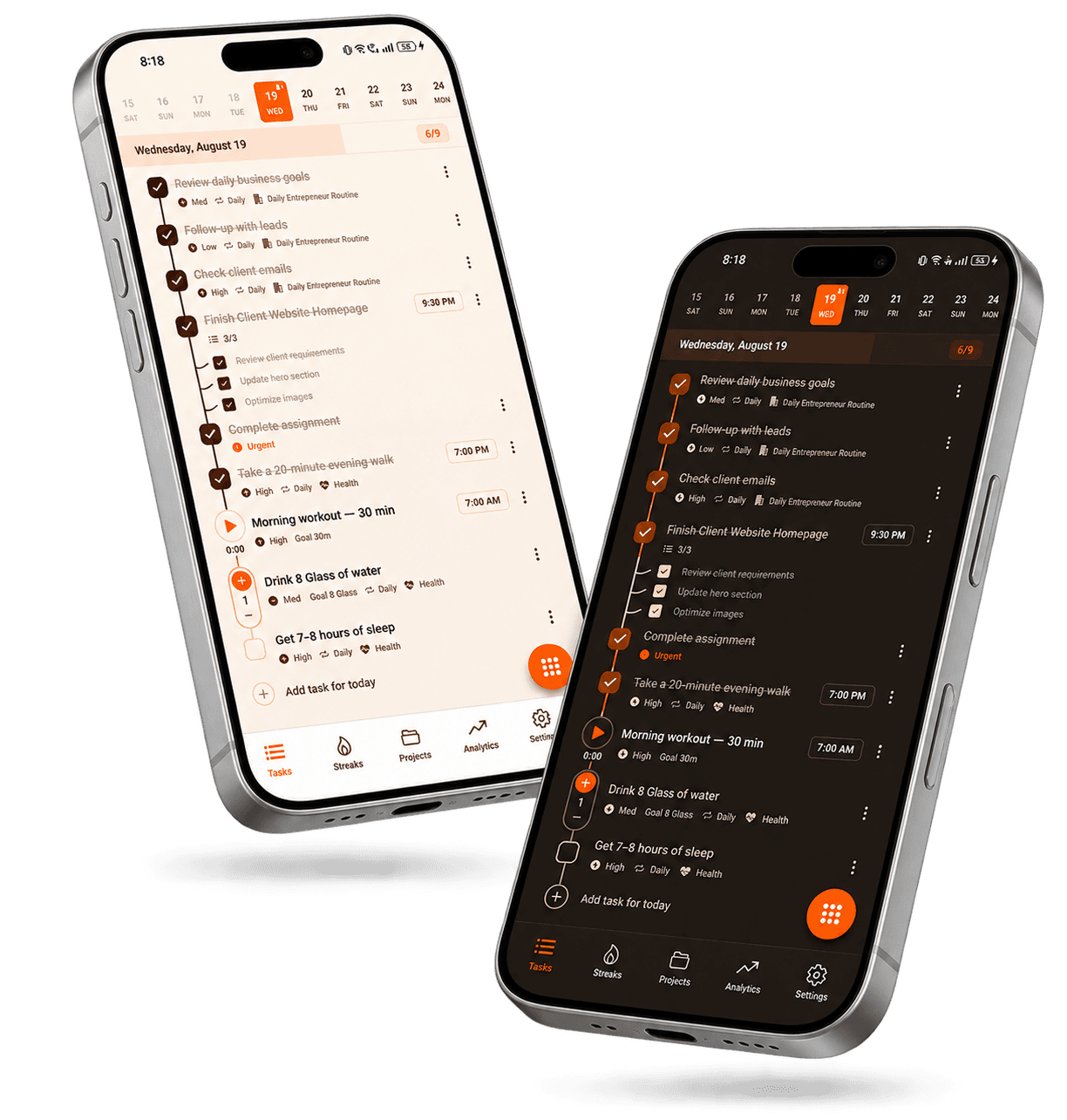
Taskke is a free task planner app for professionals on Android that keeps work tasks, priorities, reminders, recurring responsibilities, and personal routines organized in one simple system — giving you a clear view of what needs attention, without the complexity of enterprise software.
As a task planner for professionals, Taskke helps you organize work tasks, plan priorities, remember important responsibilities, manage recurring routines, build consistency, and review productivity progress over time. It's a personal task system — straightforward enough to use every day, without requiring a complicated productivity framework.
Whether you work in an office, remotely, or across different contexts, the core workflow is the same: capture what needs doing, decide what matters most, schedule what repeats, set reminders where timing counts, and use streaks to see whether your routines are holding over time.
Organize work tasks
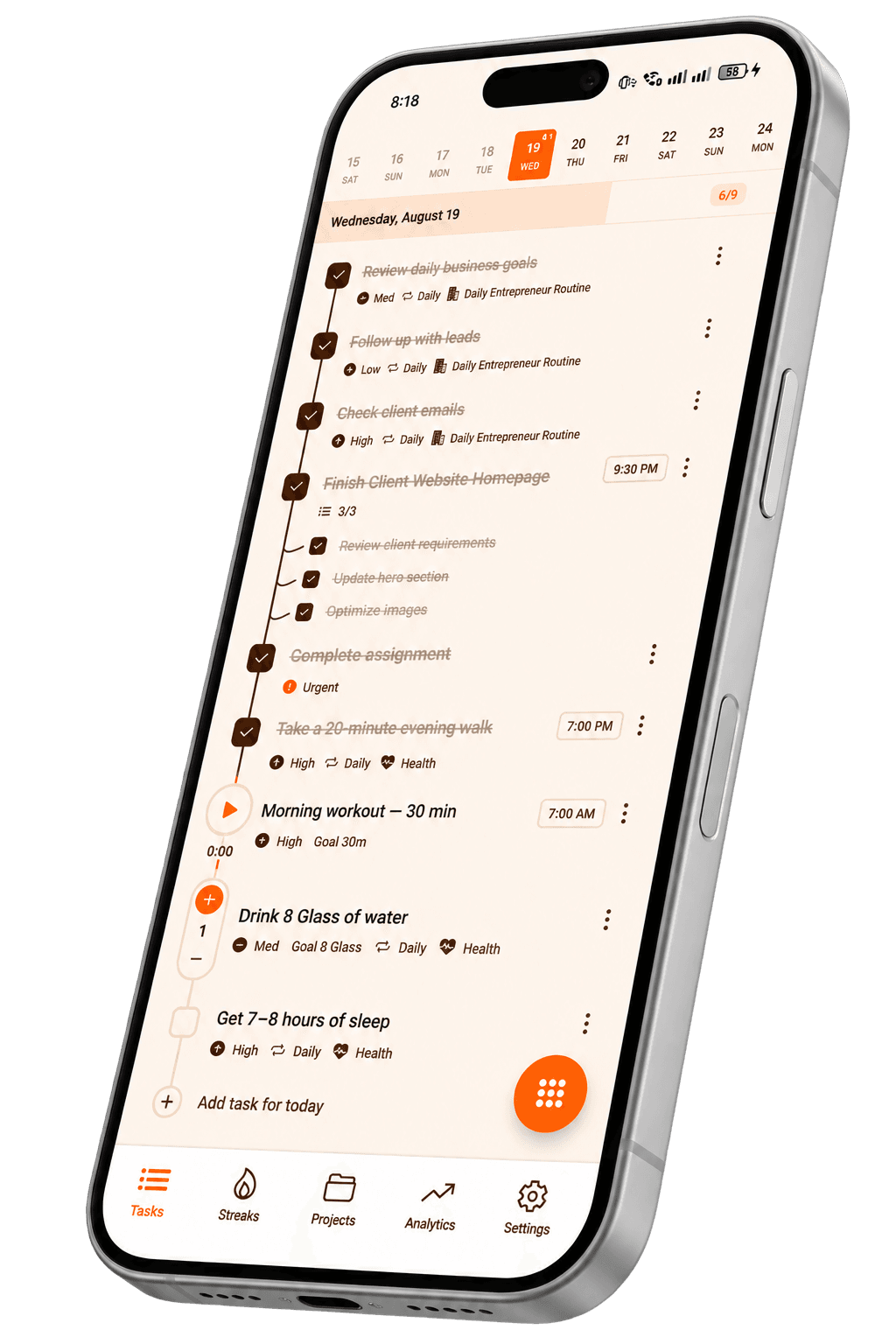
Turn responsibilities, follow-ups, deadlines, and everyday work into clear tasks you can see and manage — instead of keeping everything in your head.
Decide what needs your attention today and what can wait. Use task priorities to separate urgent work from routine items and plan the day deliberately.
Use reminders for tasks that need attention at a specific time or that cannot be completed immediately. Follow-ups, deadlines, and recurring work are good candidates.
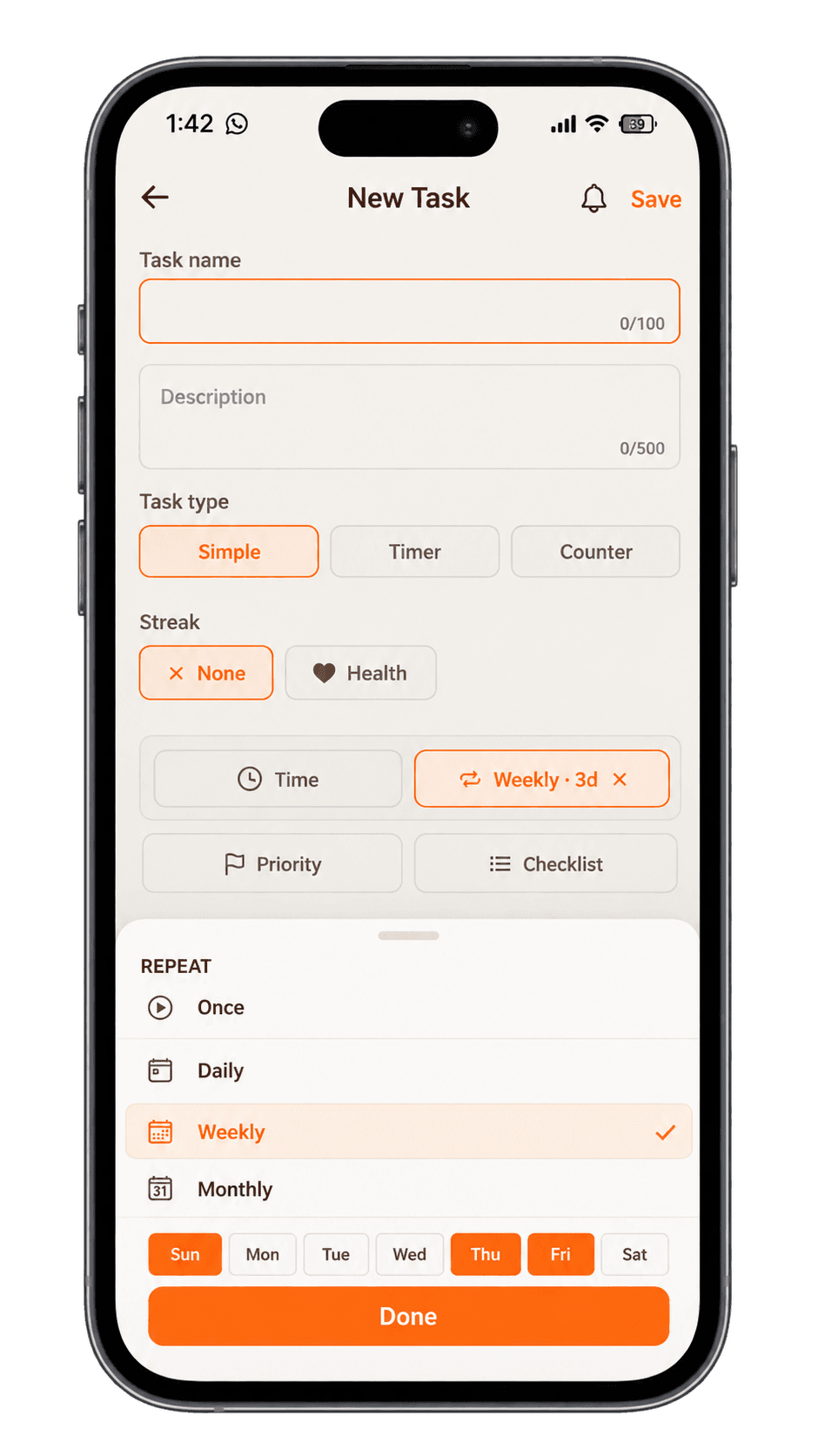
Create recurring tasks for work that happens daily, weekly, or monthly — planning sessions, reviews, reports, administrative work — so responsibilities stay visible automatically.
Use task streaks and Streak Bundles to track personal consistency across repeated tasks and routines — not just whether you planned them, but whether you actually followed through.
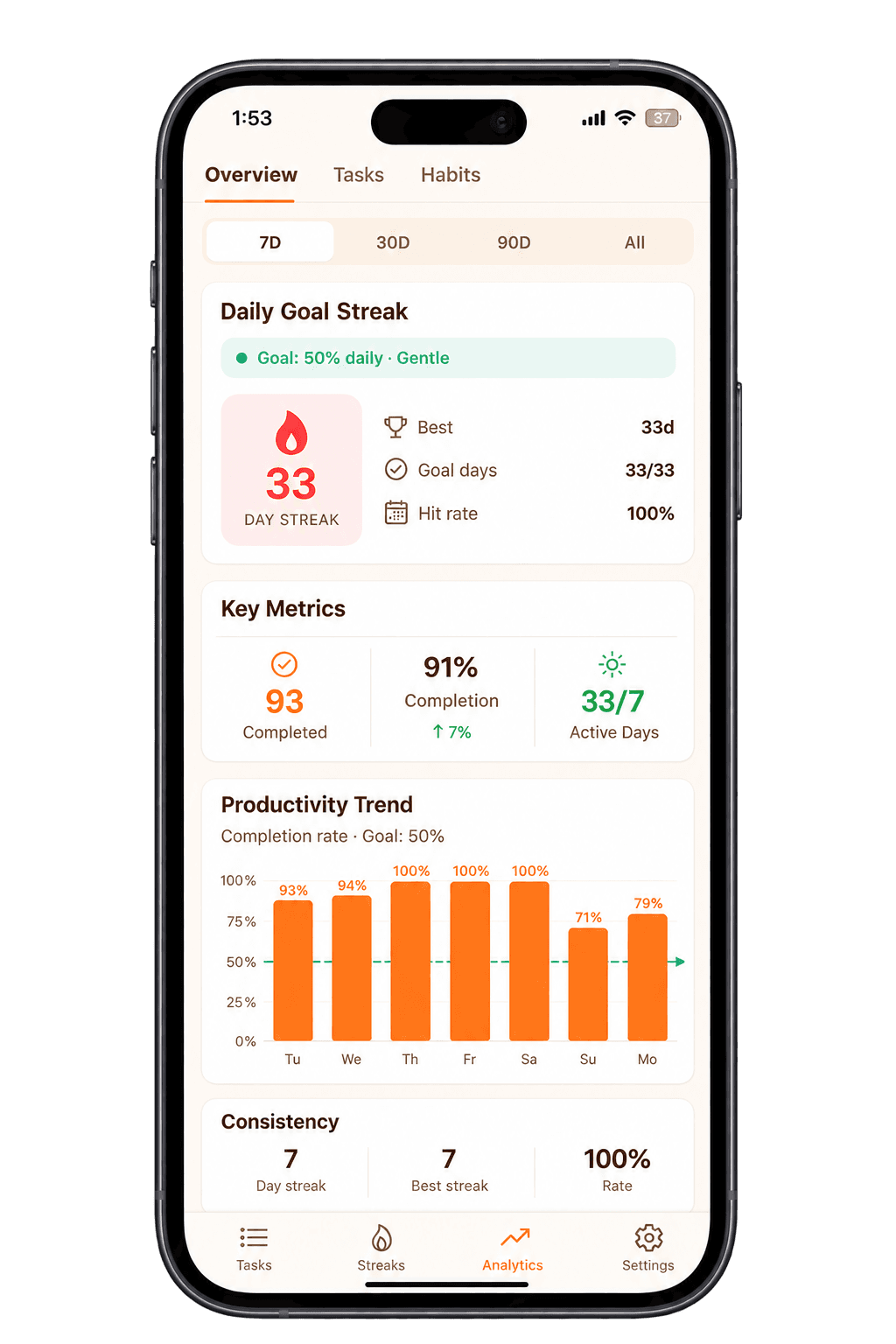
Use Taskke analytics to review task completion, activity trends, streaks, and productivity patterns across 7D, 30D, 90D, and All Time — a clearer picture than how one day feels.
A professional workday can contain priorities, deadlines, follow-ups, recurring responsibilities, and unexpected requests — all competing for the same attention. A simple task system helps you see and manage those responsibilities clearly instead of keeping track of everything in your head.
Today's priorities
Prepare today's report
Finish an important document
Review a project task
Complete a high-priority responsibility
One-off tasks with priority levels
Follow-ups
Follow up with a colleague
Review a pending request
Send an update
Check status of outstanding work
User-created tasks — not automatic follow-up management
Deadlines
Prepare presentation by Friday
Submit monthly report
Finish project task before review
Review document before deadline
Add reminders to keep deadline tasks visible
Recurring work
Weekly planning session
Monthly report preparation
Regular administrative task
Recurring team responsibility
Recurring tasks reset automatically on their schedule
Examples of tasks you could create — not built-in templates or automated workflow management.
Use cases
Ways Professionals Can Use Taskke
Professional work varies widely across roles, industries, and working styles. Here are ways the core Taskke functionality applies to everyday professional situations.
Start the day with a clear plan
Create a focused list of the work that matters most today before moving through smaller responsibilities. Use task priorities to put the most important work at the top so you are not starting the day by reacting to everything at once.
Turn a larger responsibility — a report, a project deliverable, a planning document — into individual tasks with checklists so the next specific step is always clear. Taskke tasks support descriptions and checklist items for exactly this kind of work.
Create tasks for follow-ups you need to remember and add reminders when a specific time matters. Taskke does not send messages or automate communication — it reminds you when the time comes to take action yourself.
Use recurring tasks for responsibilities that return on a predictable schedule — weekly planning, monthly reporting, regular reviews, recurring administrative work. They reset automatically so the responsibility stays in your list without being rebuilt each time.
Professional responsibilities do not have to crowd out every personal routine. Keep important personal tasks — exercise, reading, habits — visible in the same system alongside work tasks so they are not forgotten during busy periods.
Review your progress
Use analytics to look at task completion and consistency over time rather than relying only on how busy the day felt. Completion rate, active days, and productivity trends across different time periods give a more accurate picture.
Plan Your Priorities Without Overcomplicating Your Workflow
Taskke is designed to give you a straightforward way to organize the tasks you need to complete without requiring a complicated productivity framework. Add tasks, assign priorities, decide what matters today, and move forward — no elaborate setup required.
Use task priorities — urgent, high, medium, low — to separate what genuinely needs immediate attention from work that can wait. Use checklists to break bigger work into steps so different areas of your work stay clear without becoming one undifferentiated list.
01Add tasks for the work that needs doing
02Assign priorities to separate urgent from routine
03Set reminders where timing matters
04Use recurring tasks for repeated responsibilities
05Complete tasks and review progress with analytics
Many professional responsibilities repeat. Weekly planning, regular reviews, monthly administrative work, recurring reports, and other routines can be easier to manage when they are represented as recurring tasks that reset automatically on their schedule.
Set up recurring tasks once for responsibilities that follow a predictable cycle — daily, weekly, or monthly. Each task resets after completion so the responsibility stays in your list without being rebuilt manually each time. Add a reminder to any recurring task if you want a prompt at a specific time.
Example only — not preset templates. Users create their own tasks.
Reminders
Remember Important Tasks at the Right Time
Some tasks are easy to forget simply because they cannot be completed immediately — a follow-up due tomorrow, a document to review later, a recurring responsibility that needs a prompt at a consistent time. Taskke reminders let you attach a push notification to any task so important work stays visible when you need it.
Add a reminder to any task — one-off or recurring — and a push notification will arrive at the time you choose. The notification links directly back to the task so you can take action immediately.
Follow up with a colleague tomorrow
Review a document before an upcoming responsibility
Prepare for a weekly recurring task
Attend to a deadline you cannot complete right now
Notification delivery depends on your Android device settings. Check that notifications are enabled for Taskke and battery optimization is not blocking background activity.
Professional productivity is not only about completing one large task. Many routines depend on repeatedly showing up and completing smaller actions — daily planning, weekly reviews, professional learning, personal habits. Taskke streaks make that consistency visible.
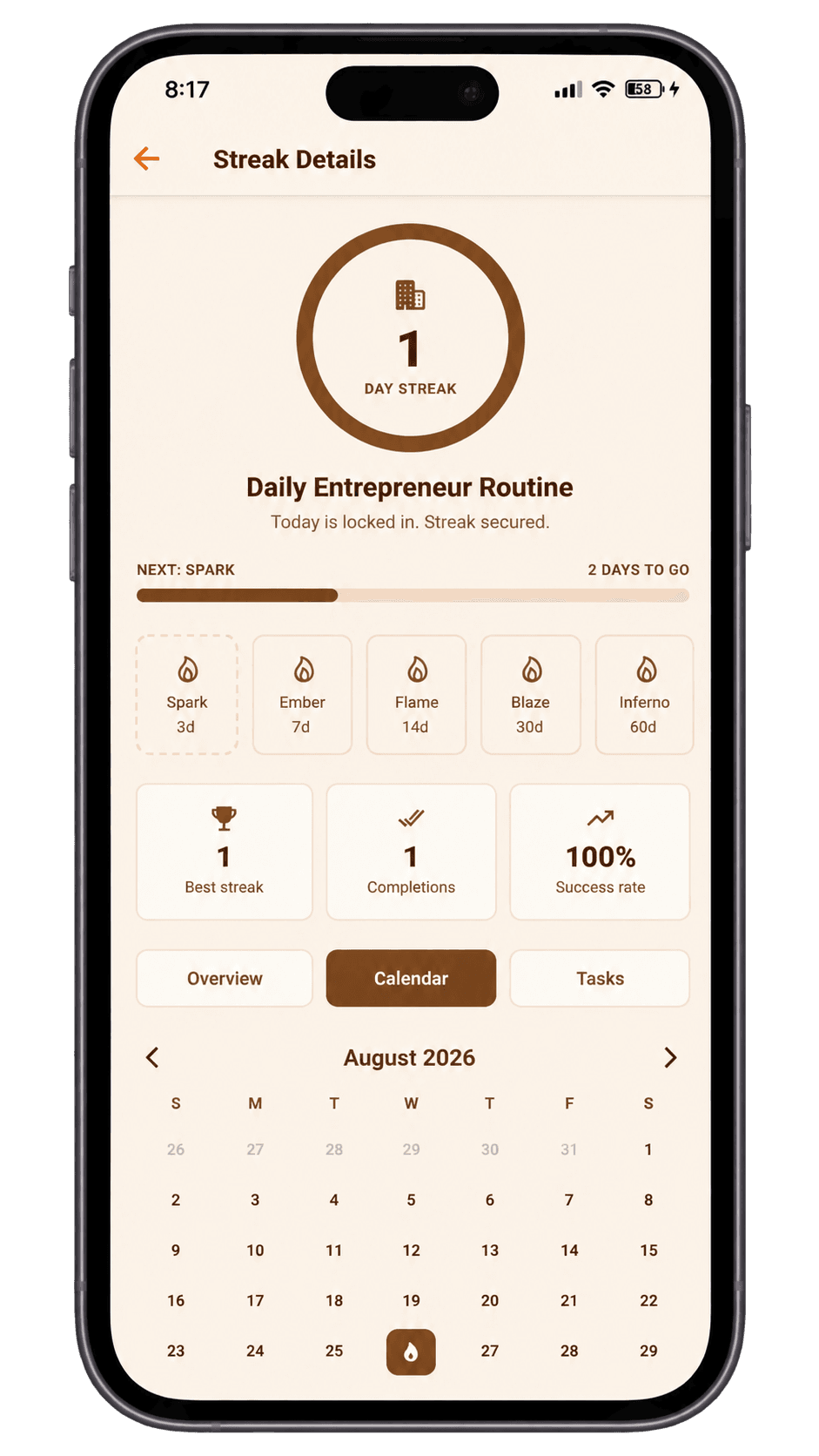
When you complete a recurring task, it contributes to a streak for that task. The streak detail shows your current streak, best streak, success rate, and a month-by-month calendar — a factual record of whether the routine is actually holding, not just whether it was scheduled.
Streak Bundles — group related tasks into one personal streak
Some routines involve several related tasks. With Taskke Streak Bundles, you can group them together and track the whole routine as one personal consistency streak. A morning routine might include reviewing priorities, planning the day, and completing a short personal activity. Instead of three separate streaks, one bundle tracks whether the whole routine held that day.
Important: Streak Bundles are a personal productivity tool — not a shared streak, team streak, or social feature of any kind.
Manage Work and Personal Responsibilities Together
For many professionals, productivity does not stop when the workday ends. Personal routines, errands, professional learning, exercise, and other responsibilities still need attention — and it can be useful to keep them in the same task system as your work.
Taskke can hold both. Use priorities and checklists to keep work tasks organized, and add personal recurring tasks alongside them. You decide what goes into the system — Taskke does not automatically separate work and personal contexts.
Example only — not preset templates. Users create their own tasks.
Example
Example: A Simple Professional Productivity System
This is one way a professional might organise Taskke — not an automatic workflow, just an illustration of how the tools fit together.
Morning
Review today's priorities
Identify the most important task
Check upcoming reminders
Plan the day's key work
Daily planning habit
During the workday
Complete priority tasks
Track smaller responsibilities
Add follow-up tasks as they come up
Mark completed work done
Use priorities to stay focused
Weekly
Review recurring responsibilities
Plan upcoming priorities
Review any unfinished tasks
Check productivity progress
Recurring weekly — consistent review habit
Consistency
Individual streak for daily planning
Streak Bundle for morning routine
Analytics to review completion
Streak history for personal habits
Tracks whether routines are actually holding
Analytics
See Your Productivity Over Time
Taskke analytics helps you review your task activity and consistency over time, giving you a clearer picture than a single busy workday can provide. Instead of judging productivity from whether one afternoon felt productive, you can look at completion and activity across weeks and months.
The analytics screen shows completed tasks, completion rate, active days, productivity trend, and daily goal streak. Review your data across 7D, 30D, 90D, or All Time. For professionals, this is useful for understanding whether task output is consistent rather than concentrated only on particularly pressured periods.
Analytics reflects task completion and personal consistency — not work performance metrics, billing, or workplace KPIs.
Keep everyday work responsibilities in a straightforward task list — add tasks, set priorities and due dates, and mark work done without extra complexity.
Clear priorities
Focus your attention on the tasks that matter instead of relying on memory alone. Use priority levels to separate urgent work from routine items and plan your day deliberately.
Repeatable routines
Use recurring tasks and reminders for responsibilities that return on a regular schedule. Set them up once and they stay in your list automatically on their chosen cycle.
Personal consistency
Track your own consistency with task streaks and Streak Bundles for related personal routines. Consistency data shows whether the routine is actually holding over time — not just whether it was planned.
Progress visibility
Review completion rate, active days, and productivity trends across 7D, 30D, 90D, and All Time with analytics. See patterns in your task output rather than judging by individual days.
Flexible personal workflow
Build a productivity system around the way you actually organize your work — not an enterprise platform's requirements. Taskke handles tasks, routines, and progress for individuals.
Get started
Organize Your Work. Focus on What Matters.
Turn work responsibilities and personal routines into clear tasks, repeatable habits, and visible progress with Taskke. Free to download on Google Play.
Common questions about using Taskke as a working professional. Visit the Help Center for more detailed answers.
Yes. Taskke can help professionals organize work tasks, plan priorities, set reminders, manage recurring responsibilities, build consistency, and review productivity progress. It is a personal task-management app designed for individual productivity, not an enterprise project-management platform.
Yes. You can create tasks for professional responsibilities such as reports, follow-ups, planning, deadlines, project tasks, and recurring work. Tasks can have priorities, descriptions, checklists, and reminders. Bigger pieces of work can be broken into checklist steps.
Yes. Taskke works as a to-do list for work: add work tasks with priorities (low, medium, high, urgent), due dates, reminders, and checklists, and repeat routine work daily, weekly, or monthly — on your own phone, separate from team tools.
Yes. Taskke can be used to organize tasks and set priorities for the day — helping you create a clear list of work that needs attention and decide what needs to be done first. It is a personal task system rather than an automated planner.
Yes. Taskke supports daily, weekly, and monthly recurring tasks. Once set up, a recurring task resets automatically on its schedule so repeated responsibilities — weekly planning, monthly reports, regular reviews — stay in your list without being recreated manually.
Yes. You can add a reminder to any task in Taskke and receive a push notification at the time you choose. This is useful for follow-ups, deadlines, and recurring responsibilities that need attention at a specific time. Reminders are set manually on individual tasks — Taskke does not detect deadlines automatically.
Yes. Professionals can use task streaks to track personal consistency on tasks and routines they repeat regularly — daily planning, weekly reviews, professional learning, personal habits, and other recurring activities. Streak data shows current streak, best streak, success rate, and a calendar history.
Streak Bundles let you group related personal tasks together and track them as one consistency streak. For example, a morning routine of reviewing priorities, planning the day, and completing a personal task can be grouped into one bundle that tracks whether the whole routine holds each day. Streak Bundles are a personal productivity tool — they are not shared team streaks or social features.
No. Taskke is a personal productivity and task-management app. It can help you organize your own work responsibilities, build routines, and track productivity, but it is not an enterprise project-management, HR, CRM, accounting, or workplace-management platform. It does not include team collaboration, shared workspaces, timesheets, or organizational management features.
Yes. Taskke has a permanent free plan with unlimited one-off tasks, up to 4 daily, 2 weekly, and 2 monthly recurring tasks, 1 Streak Bundle with up to 5 tasks, and up to 50 AI-created tasks per week. Taskke Pro costs $2.99/month or $24/year, makes recurring tasks and Streak Bundles unlimited, raises AI-created tasks to 1,000 per week, and adds full analytics; new users get a 15-day free Pro trial.