Taskke for Freelancers

A Simple Productivity App for Freelancers

Taskke is a free productivity app for freelancers on Android. Freelancers often balance multiple projects, clients, deadlines, recurring responsibilities, and personal tasks — all at once. Taskke helps you organize client work, plan daily priorities, handle repeating responsibilities with recurring tasks, set reminders for what matters, and track consistency over time.

Free on Google Play · Android phones & tablets

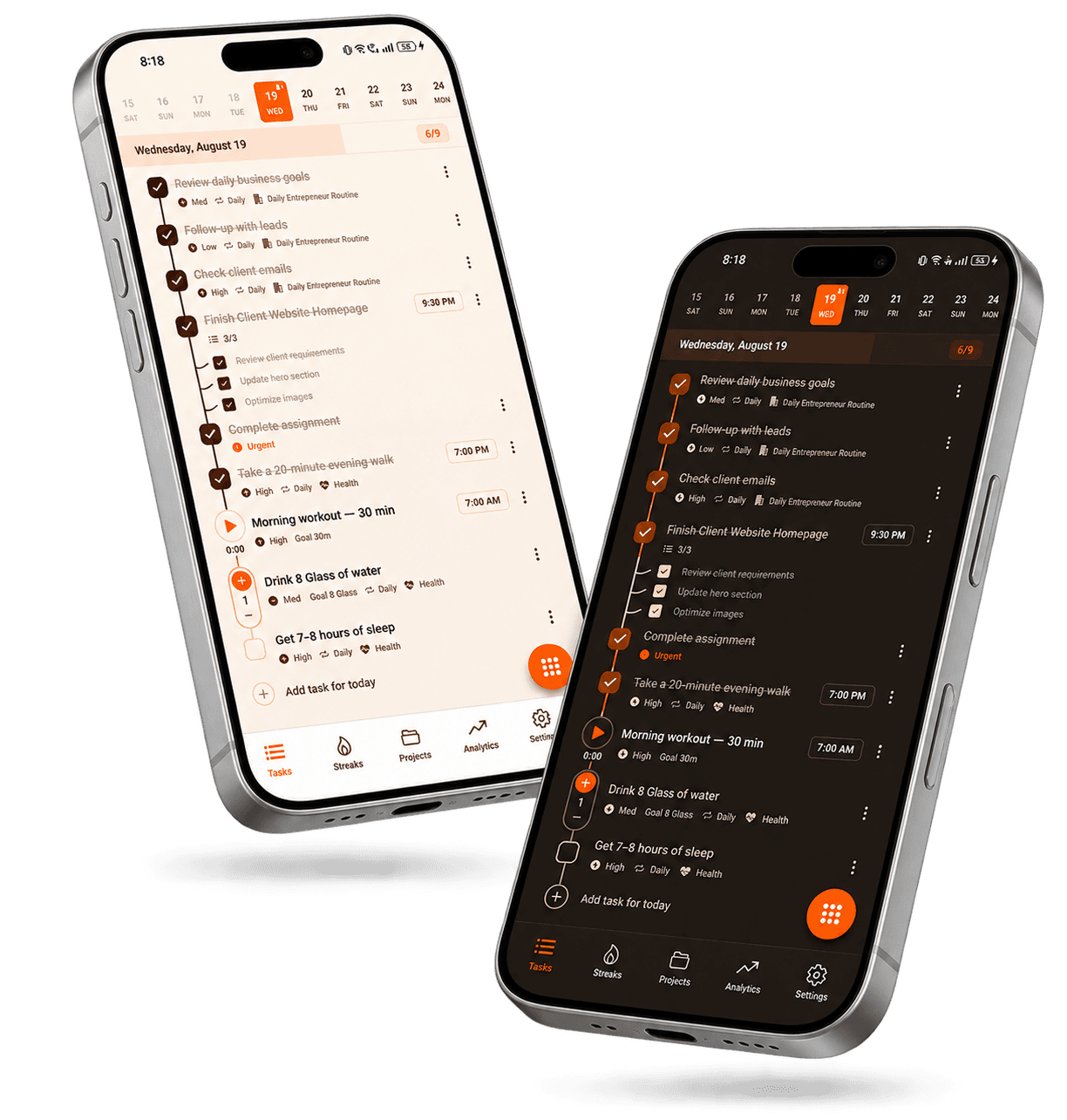
Taskke productivity app for freelancers on Android, showing a task list with client project tasks, a subtask checklist, daily recurring tasks, reminder times, and priorities
  • Task management
  • Checklists
  • Recurring tasks
  • Reminders
  • Streak tracking
  • Streak Bundles
  • Analytics
For freelancers

How Can Taskke Help Freelancers?

Taskke helps freelancers organize client work, plan priorities, manage recurring responsibilities, set reminders, and track consistency. It can serve as one place for the tasks that keep freelance projects and daily work moving — without adding a complicated system on top of your workflow.

The core idea is straightforward: capture client deliverables and responsibilities as tasks, set priorities for what needs attention first, schedule things that repeat on daily, weekly, or monthly recurring tasks, add reminders where timing matters, and use streaks to see whether your personal routines are actually consistent over time.

Freelance workflow

Keep Freelance Work Organized

A practical freelance workflow doesn't need to be complicated. Capture work as tasks, decide what comes first, schedule things that repeat, and let the data show you how consistently you're getting work done.

Capture

Add client work as tasks

Create a task for each client deliverable, revision, research piece, or administrative responsibility. Add a description or checklist to break work into steps, and set a priority so the most important work stays visible.

To-do list
Plan

Decide what needs attention first

Assign priority levels — urgent, high, medium, or low — to separate what needs immediate attention from what can wait. Break bigger client jobs into checklist steps so each engagement stays clear.

Task planner
Organize

Break work into steps

Use checklists inside a task to split client work into steps — for example, research, drafting, and revisions — so work stays organized even when multiple engagements are active.

Task planner
Repeat

Schedule your recurring responsibilities

Create recurring tasks for things that happen on a regular schedule — weekly planning sessions, regular project reviews, monthly administrative work. They reset automatically so the routine stays in your list without re-creating it manually.

Recurring tasks
Remember

Get notified at the right time

Add a reminder to any task and Taskke will send a push notification at the time you choose. Useful for client deadlines, follow-up tasks, and any responsibility that benefits from a prompt at a specific moment.

Reminders
Review

Understand your completion patterns

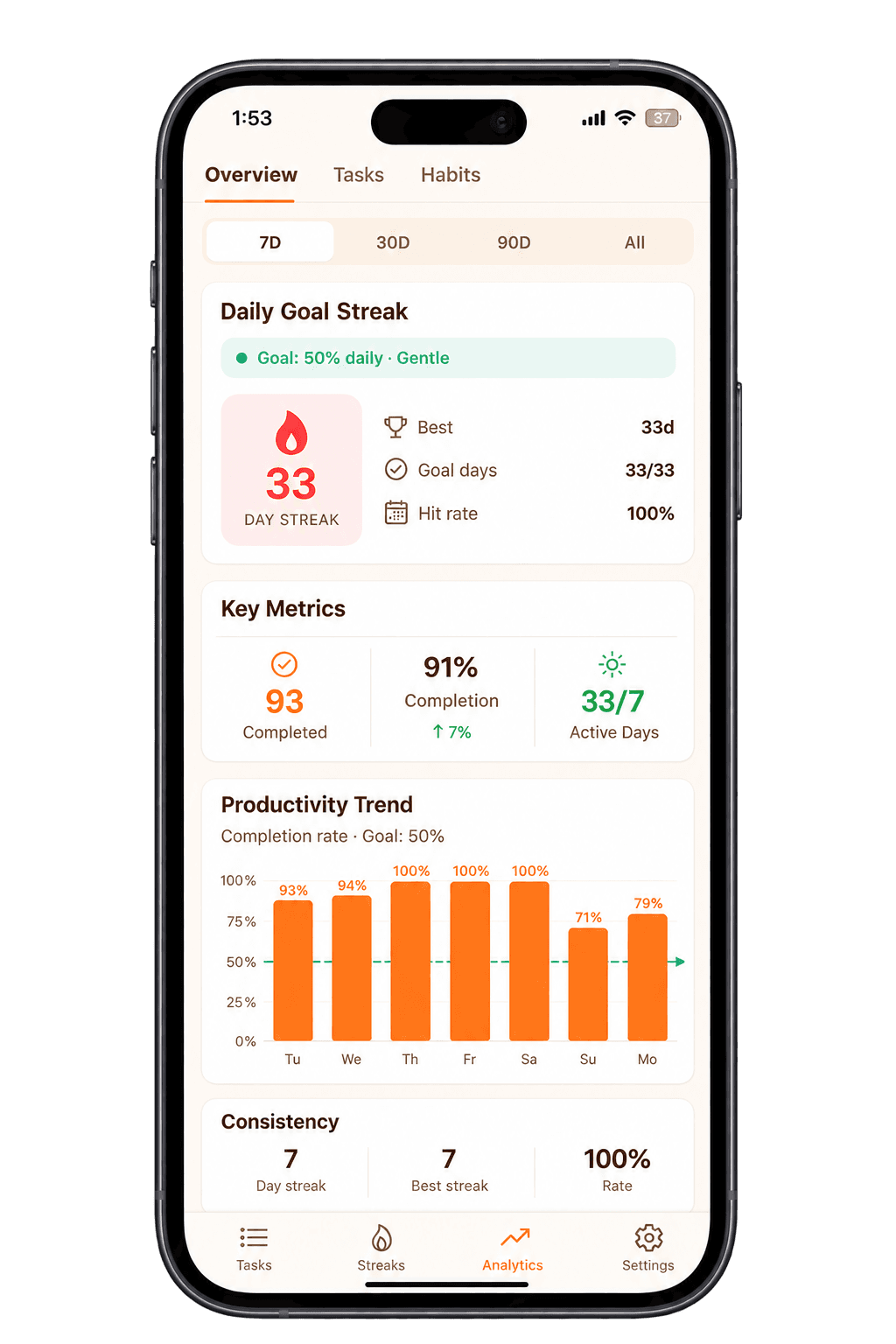
Analytics shows your completed task count, completion rate, active days, productivity trend, and daily goal streak across 7D, 30D, 90D, and All Time. Useful for reviewing whether your work output is consistent over time.

Analytics
Use cases

Ways Freelancers Can Use Taskke

Freelance work varies across disciplines, clients, and working styles. Here are specific ways the core Taskke functionality applies to typical freelance situations.

Client Deliverables

Add each client deliverable as a task with a priority and checklist of steps — research, drafting, revisions, final review. Work through each step and mark it done. Taskke does not connect to client systems or handle file delivery; it organizes the work you need to complete.

To-do list

Multiple Clients

Keep each client engagement clear with priorities, due dates, and checklist steps for different phases or work types, and use reminders so deadlines for several clients don't slip.

Task planner

Recurring Client Work

Some client work repeats on a predictable schedule — regular content production, weekly reporting, monthly reviews. Create a recurring task on a daily, weekly, or monthly schedule and it resets automatically, so the responsibility stays visible without rebuilding it each time.

Recurring tasks

Daily Priorities

Freelance days often involve competing demands. Use task priorities to identify what needs your attention first each day and plan your work accordingly. Separate urgent client deadlines from lower-priority tasks so nothing important gets lost in a long list.

Task planner

Follow-Ups

When you need to follow up on something at a specific point — checking in on a project status, revisiting a task after a break — create a task with a reminder. The notification will arrive at the time you set. Taskke does not automatically send client messages; it reminds you to take action.

Reminders

Administrative Work

Recurring business responsibilities — preparing invoices as a task reminder, updating a portfolio, reviewing active projects, organizing upcoming work — can all be added as recurring tasks. These are user-created tasks; Taskke does not perform those activities itself.

Recurring tasks
Consistency

Build Consistency Into Your Freelance Routine

Freelance work is often flexible, which makes consistent personal routines harder to maintain. Regular habits — daily planning, project reviews, recurring administrative tasks — tend to slip without a visible record of whether they're actually happening.

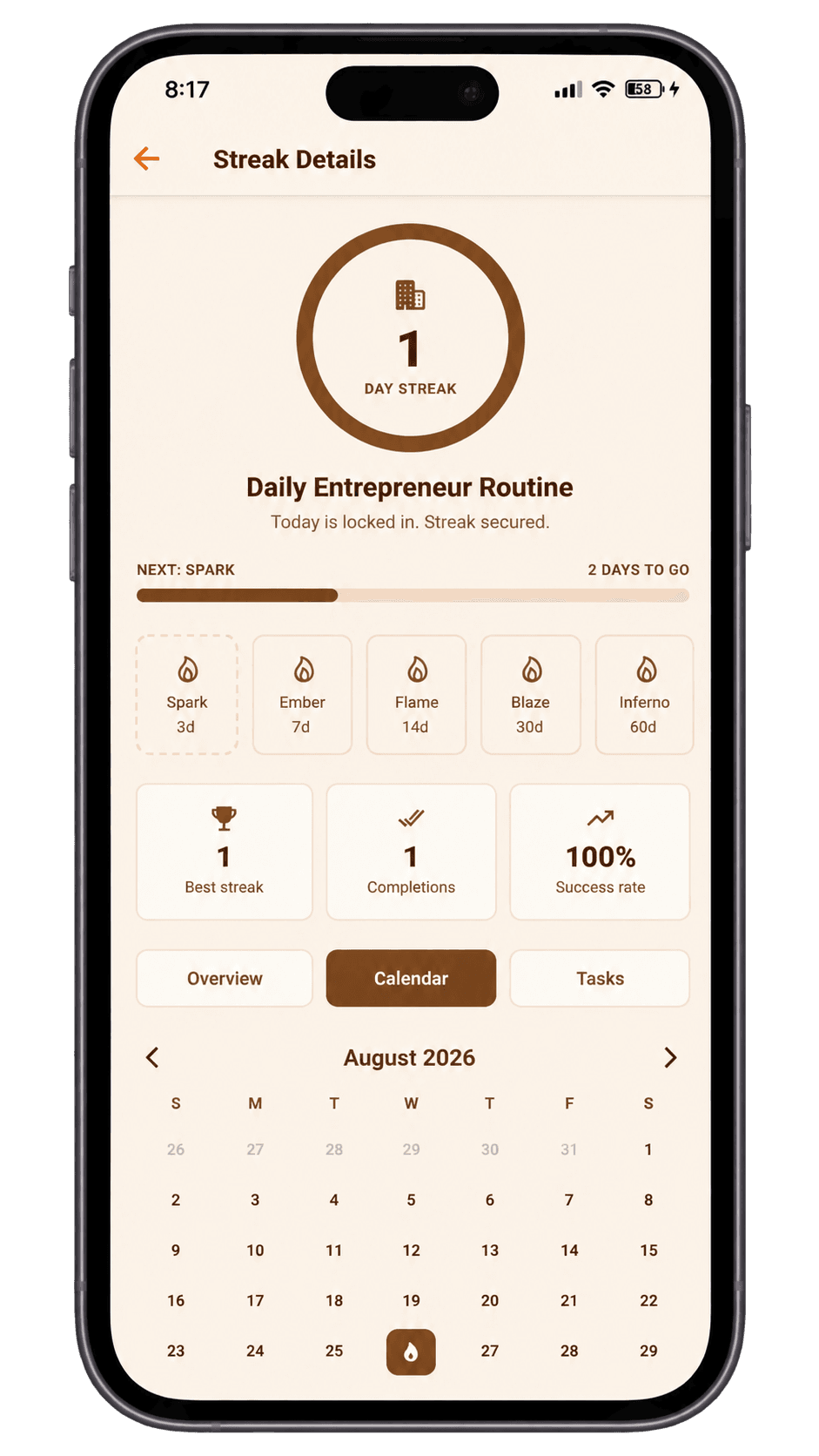
When you complete a recurring task in Taskke, it contributes to a streak for that task. The streak detail view shows your current streak, best streak, success rate, and a month-by-month completion calendar — a factual record of how consistently you're following through on that responsibility.

Streak Bundles for your personal workflow

If your daily or weekly routine involves several related tasks — planning tomorrow's work, reviewing active projects, updating task priorities — you can group them into a Streak Bundle. Instead of each task having its own separate streak, the bundle tracks whether you completed enough tasks from the group each day. The whole routine gets one shared consistency record.

Important: Streak Bundles are a personal grouping tool. They do not involve sharing streaks with clients, collaborators, or anyone else.

Taskke streak tracker showing day streak, best streak, success rate, milestone progress, and calendar history for a recurring freelance task
Recurring tasks

Don't Rebuild the Same Routine Every Week

Many freelance responsibilities repeat on a predictable schedule. Taskke supports daily, weekly, and monthly recurring tasks — each resets automatically after completion so the activity stays in your list without you having to recreate it manually each time.

Set up your recurring freelance tasks once and they stay part of your workflow on the schedule you choose. Add a reminder to any recurring task if you want a notification at a specific time.

Daily

  • Check priorities and active tasks
  • Review client work in progress
  • Plan next work session

Weekly

  • Review all active projects
  • Plan upcoming client work
  • Follow up on outstanding tasks
  • Prepare invoice reminders

Monthly

  • Review recurring responsibilities
  • Organize upcoming project priorities
  • Monthly business planning review

Example only — not preset templates. Freelancers create their own tasks.

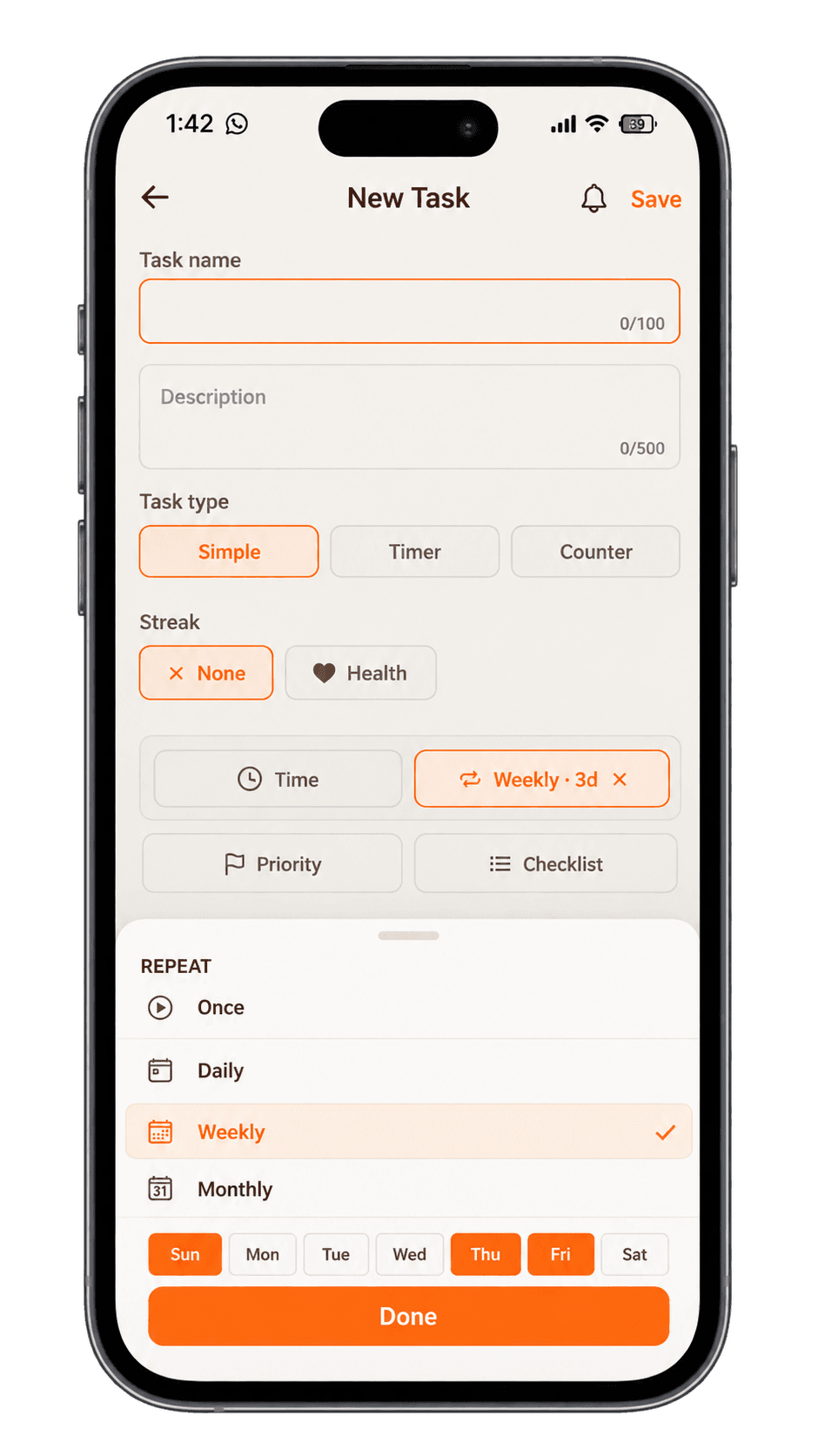
Creating a weekly recurring task in Taskke that repeats on Sunday, Thursday, and Friday, with time, reminder, priority, and checklist options
Reminders

Keep Important Responsibilities on Your Radar

Reminders are for tasks where timing matters — client deadlines, follow-up tasks, recurring work that should happen at a consistent time, and project milestones you've captured as tasks.

Add a reminder to any task in Taskke and a push notification will arrive at the time you choose. Reminders attach directly to the task so the notification points to the relevant work. You can add reminders to one-off tasks and recurring tasks alike.

Note: notification delivery depends on your Android device settings. If reminders are not arriving, check that notifications are enabled for Taskke in your Android settings and that battery optimization is not blocking background activity.

Work and personal

Keep Work and Personal Tasks Together

Freelancers manage client responsibilities alongside personal routines — exercise, finances, personal commitments, and other recurring activities that don't belong to a specific project. Taskke can hold all of those in one place without requiring a separate productivity system for each area of your life.

Use priorities and checklists to keep client engagements apart, and keep personal recurring tasks in your main list alongside work. Priorities let you decide what needs focus on any given day, whether it's client work or a personal responsibility.

Client work

  • Finish homepage revisions
  • Prepare client presentation
  • Review requested changes

Personal & admin

  • Weekly project review (recurring)
  • Invoice reminder (recurring monthly)
  • Personal fitness routine (recurring daily)

Example only — not preset templates. Users create their own tasks.

Example

Example: A Simple Freelancer Productivity Setup

This is one way a freelancer might organise Taskke — not a preset template, just an illustration of how the tools fit together.

Client work

  • Finish homepage revisions
  • Prepare client presentation
  • Review requested changes

One-off tasks with priorities and checklists

Daily

  • Check priorities (recurring daily)
  • Review active tasks (recurring daily)
  • Plan next work session (recurring daily)

Recurring daily — reset automatically each day

Weekly

  • Review project progress
  • Plan upcoming client work
  • Follow up on outstanding tasks

Recurring weekly — consistent planning habit

Consistency

  • Individual streak for daily planning
  • Streak Bundle for planning + review + priorities
  • Analytics to review task completion

Tracks whether the routine is actually holding

System

A Simple System for Independent Work

Freelancers need clarity and organization, not an elaborate platform. Taskke provides a straightforward chain of tools — tasks, priorities, recurring work, reminders, streaks, and analytics — that layer together to support independent work without requiring constant maintenance.

Tasks

Capture client work and responsibilities as tasks.

Priorities

Separate urgent client work from lower-priority items.

Recurring tasks

Keep repeated freelance responsibilities in your list automatically.

Reminders

Get notified when deadlines and follow-ups need attention.

Streaks

See whether your personal routines are actually consistent.

Analytics

Review your task completion and output over time.

Analytics

See How Consistently You're Getting Work Done

Taskke analytics shows your completed task count, completion rate, active days, productivity trend, and daily goal streak. You can review this data across 7D, 30D, 90D, and All Time ranges.

For freelancers, this is useful for understanding whether task output is consistent over weeks and months — or whether certain periods are productive while others drift. Analytics reflects task completion and consistency, not revenue, billable hours, or client outcomes.

Taskke analytics screen showing task completion rate, active days, productivity trend, and daily goal streak over time
Why Taskke

Why Freelancers Can Use Taskke

Organize client work

Keep project-related tasks visible and organized rather than relying on memory or scattered notes. Use priorities and checklists to keep different client engagements apart.

Plan priorities

Use task priorities to decide what deserves attention first each day. Separate urgent client deadlines from routine tasks so the most important work gets done first.

Manage recurring responsibilities

Daily, weekly, and monthly recurring tasks reset automatically. Repeated freelance responsibilities stay in your list on their schedule without being rebuilt manually each time.

Set reminders

Add push notification reminders to any task — client deadlines, follow-ups, recurring work blocks — so important responsibilities come to your attention at the right moment.

Build consistency

Use individual task streaks to track whether recurring personal routines are actually holding. Group related workflow tasks into a Streak Bundle for a single shared consistency record.

Understand your progress

Analytics shows completion rate, active days, productivity trends, and daily goal streaks across 7D, 30D, 90D, and All Time. See whether your task output is consistent over time.

Get started

Bring Your Freelance Tasks Into One System

Organize client projects, recurring responsibilities, reminders, and personal routines in one place. Free to download on Google Play.

Explore Taskke for different workflows — Who Taskke is for.

FAQ

Freelancer
Questions

Common questions about using Taskke as a freelancer. Visit the Help Center for more detailed answers.

Yes. Taskke is a productivity and task-management app that helps freelancers organize client work, plan priorities, manage recurring responsibilities, set reminders for deadlines and follow-ups, build consistent personal routines with streaks and Streak Bundles, and review progress through analytics.

Yes. Freelancers can represent client-related work as tasks in Taskke — deliverables, revisions, research, and other responsibilities. Tasks can have priorities, due dates, checklists, and reminders. Taskke does not connect to client systems, send messages, or handle file delivery; it organizes the work you need to complete.

Yes. Create tasks for each client, set priorities and due dates, and break bigger jobs into checklist steps such as research, drafting, and revisions. Taskke is a personal task app, not a client-management system.

Yes. You can add a reminder to any task in Taskke and receive a push notification at the time you choose. This is useful for client deadlines, follow-up tasks, and recurring work that should happen at a consistent time. Taskke does not detect deadlines automatically — reminders are set manually on individual tasks.

No. Taskke is a task and routine app, not a time-billing or invoicing tool. Timer tasks show how long you focused on a piece of work, but Taskke does not create client reports, track billable rates, or send invoices — pair it with your invoicing tool if you bill hourly.

Yes. Taskke supports daily, weekly, and monthly recurring tasks. Once set up, a recurring task resets automatically on its schedule so the responsibility stays in your list without being recreated manually. This is useful for repeated freelance work such as weekly project reviews, regular client responsibilities, and monthly planning.

Yes. Freelancers can create recurring tasks for regular daily, weekly, or monthly routines, set reminders to prompt those routines at the right time, and use streak tracking to see whether the routine is actually consistent over time. Streak Bundles let you group related routine tasks into one shared consistency record.

A Streak Bundle lets you group related personal tasks — for example, planning tomorrow's work, reviewing active projects, and updating task priorities — into one shared consistency streak. Instead of each task having its own separate streak, the bundle tracks whether you completed enough tasks from the group each day. Streak Bundles are a personal productivity tool. They do not involve sharing streaks with clients, collaborators, or anyone else.

Yes. Taskke has a permanent free plan that includes unlimited one-off tasks, up to 4 daily recurring tasks, 2 weekly recurring tasks, 2 monthly recurring tasks, 1 Streak Bundle with up to 5 tasks, and 50 AI-created tasks per week. A 15-day free Pro trial is included when you first download the app. Pro costs $2.99/month or $24/year and removes these limits. There is no special freelancer pricing.