
Recurring Tasks App for AndroidRecurring Tasks Made Simple.
Taskke is a free recurring tasks app for Android. Repeat tasks daily, weekly on the days you choose, or monthly — and manage routines without recreating the same task every time.
Free on Google Play · Android phones & tablets
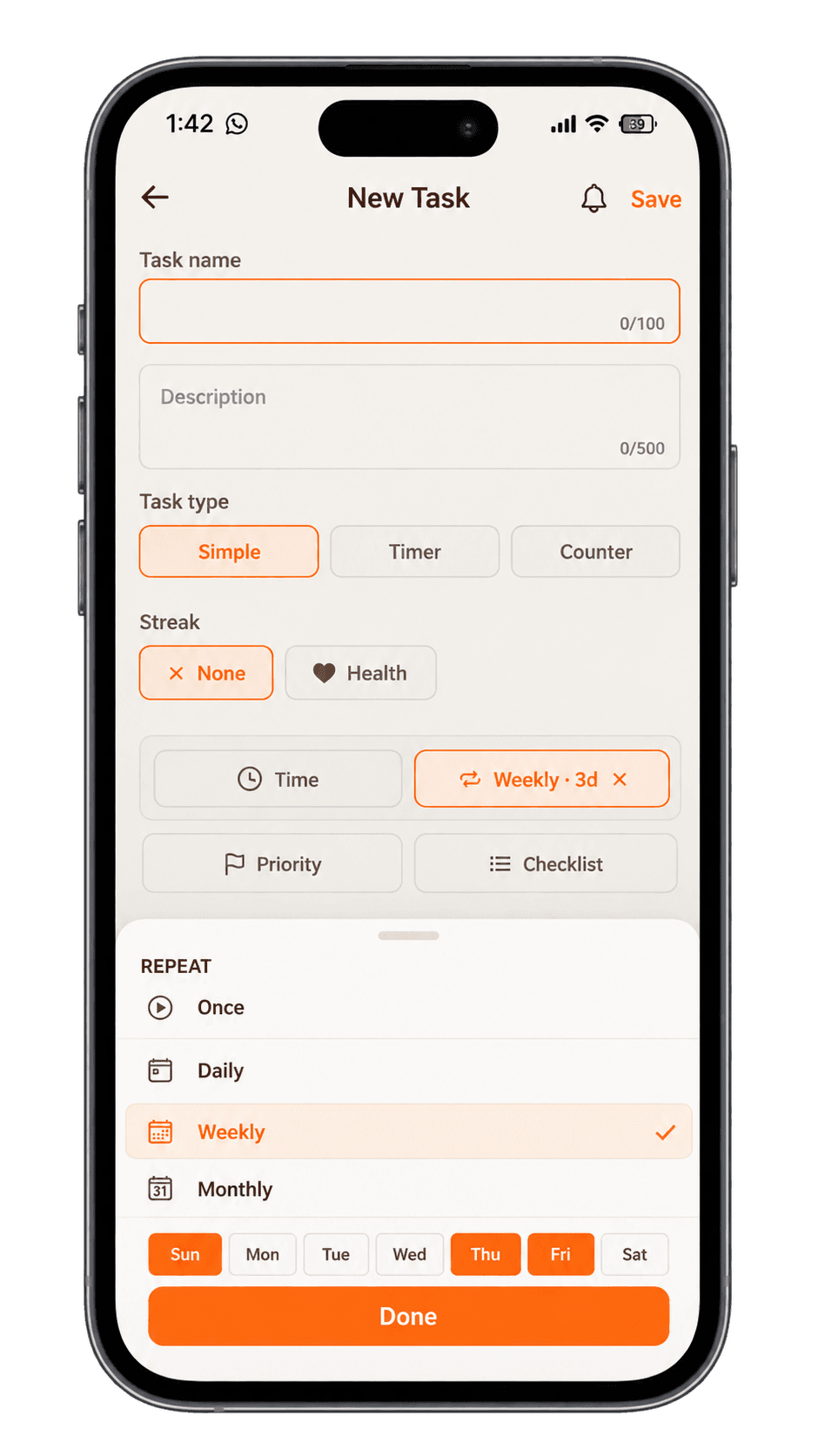
- Daily, weekly & monthly recurrence
- Recurring reminders
- Automatic schedule reset
- Track completions
- Streak tracking
- Consistency analytics
Tasks that repeat on a schedule — set once, run every time
Recurring tasks are tasks that automatically repeat on a defined schedule, such as every day, every week, or every month. Instead of recreating the same task manually each time, you set it once and it resets automatically on your chosen frequency.
They are useful for any responsibility that happens regularly — daily exercise, weekly planning, monthly financial reviews, regular study sessions, or recurring work tasks. Taskke lets you create daily, weekly, and monthly recurring tasks so repeated responsibilities can become a natural part of your regular workflow.
Taskke's recurring tasks at a glance
- Repeat options
- Once, daily, weekly, or monthly
- Weekly repeats
- On the exact days you choose, e.g. Sun, Thu, Fri
- Free plan
- Up to 4 daily, 2 weekly, and 2 monthly repeats
- Taskke Pro
- Unlimited recurring tasks — $2.99/mo or $24/yr
- After you finish
- The task comes back on its next scheduled day
- Reminders
- A push reminder each time the task returns
- Streaks
- Every on-schedule completion grows its streak
- Platform
- Android phones and tablets
Why Use Recurring Tasks?
Many responsibilities in daily life aren't one-time events — they come back. Exercise. Weekly planning. Monthly reviews. Recurring tasks exist precisely for these: the work that repeats is the work you should only have to set up once.
Without recurring tasks, every repetition requires manual effort just to keep the task in front of you. With them, the schedule handles itself — you can focus on completing the work, not managing the list.
Without recurring tasks
- 01Create task
- 02Complete task
- 03Remember to create it again
- 04Create it again
- 05Repeat every time
Manual effort every single time.
With recurring tasks
- 01Set the schedule once
- 02Complete the task
- 03It resets automatically
- 04Continue the routine
Set it once. It keeps going.
Create Daily Recurring Tasks
Some responsibilities happen every single day. Setting them as daily recurring tasks means they appear in your task list each morning without any manual effort — ready to be worked through and checked off.
Daily recurring tasks are useful for routines you want to maintain consistently: study, exercise, focused work, or any habit that benefits from showing up every day.
Daily examples
- Morning planning review
- Daily study session
- Exercise or workout
- Read for 20 minutes
- Drink enough water
- Evening journal
- Work routine check-in
- Daily review
Weekly examples
- Weekly planning session
- Friday review
- Weekly workout routine
- Client reporting
- Household cleaning
- Budget check-in
- Team check-in prep
- Weekly retrospective
Schedule Weekly Tasks
Not everything needs to happen daily. Weekly recurring tasks are for responsibilities that come around on a regular weekly schedule — a planning session, a client update, a review, or a routine you want to maintain once a week.
Set them up once and they appear at the right interval, keeping your weekly rhythm without manual tracking.
Plan Monthly Recurring Tasks
Some responsibilities only come around once a month, but they still matter. Monthly recurring tasks ensure these don't fall off your radar — they appear automatically each month so nothing gets missed.
Whether it's a financial review, a planning session, a project retrospective, or a household responsibility, monthly recurring tasks keep these regular commitments visible without the need to remember them manually.
Monthly examples
- Monthly financial review
- Subscription review
- Monthly planning
- Project retrospective
- Deep clean
- Monthly goals check
- Backup important files
- Household responsibilities
Never Lose Track of Repeated Responsibilities
A recurring task defines what repeats. A reminder helps you remember when to act on it.
Adding a reminder to a recurring task means you'll receive a push notification at your chosen time — so the task is not only scheduled but actively brought to your attention when it matters. This combination is particularly useful for routines that can easily slip when you get busy.
Recurring schedule
The task resets automatically. It's always there when it's due.
Reminder notification
A push notification brings the task to your attention at the right time.
You complete it
Check it off. The next occurrence is already waiting for you.
Build a To-Do List That Keeps Up With Your Routine
A standard to-do list works well for one-off tasks. Recurring tasks make it work for everything that comes around again. Taskke's task list handles both — so you don't need separate systems for one-time work and regular routines.
For example: “Submit assignment” belongs on a one-time task. “Review notes every weekday” belongs as a recurring task. Both live in the same list, so your whole workload stays in one place.
One-time tasks
Recurring tasks
Plan Repeated Work Once
When you plan your week, you shouldn't have to add “weekly review” again every time. Set it as a recurring task and it's automatically part of your plan every week — no manual entry, no risk of forgetting.
Recurring tasks and task planning work together in Taskke: your planner handles the structure and priorities, while recurring tasks handle the rhythm of regular responsibilities.
Without recurring tasks
Monday: add 'weekly review'
Next week: add 'weekly review' again
The week after: add it again...
With recurring tasks
Set 'weekly review' as a recurring task once
It appears every week automatically
Focus on the work, not the planning
See Your Progress Over Time
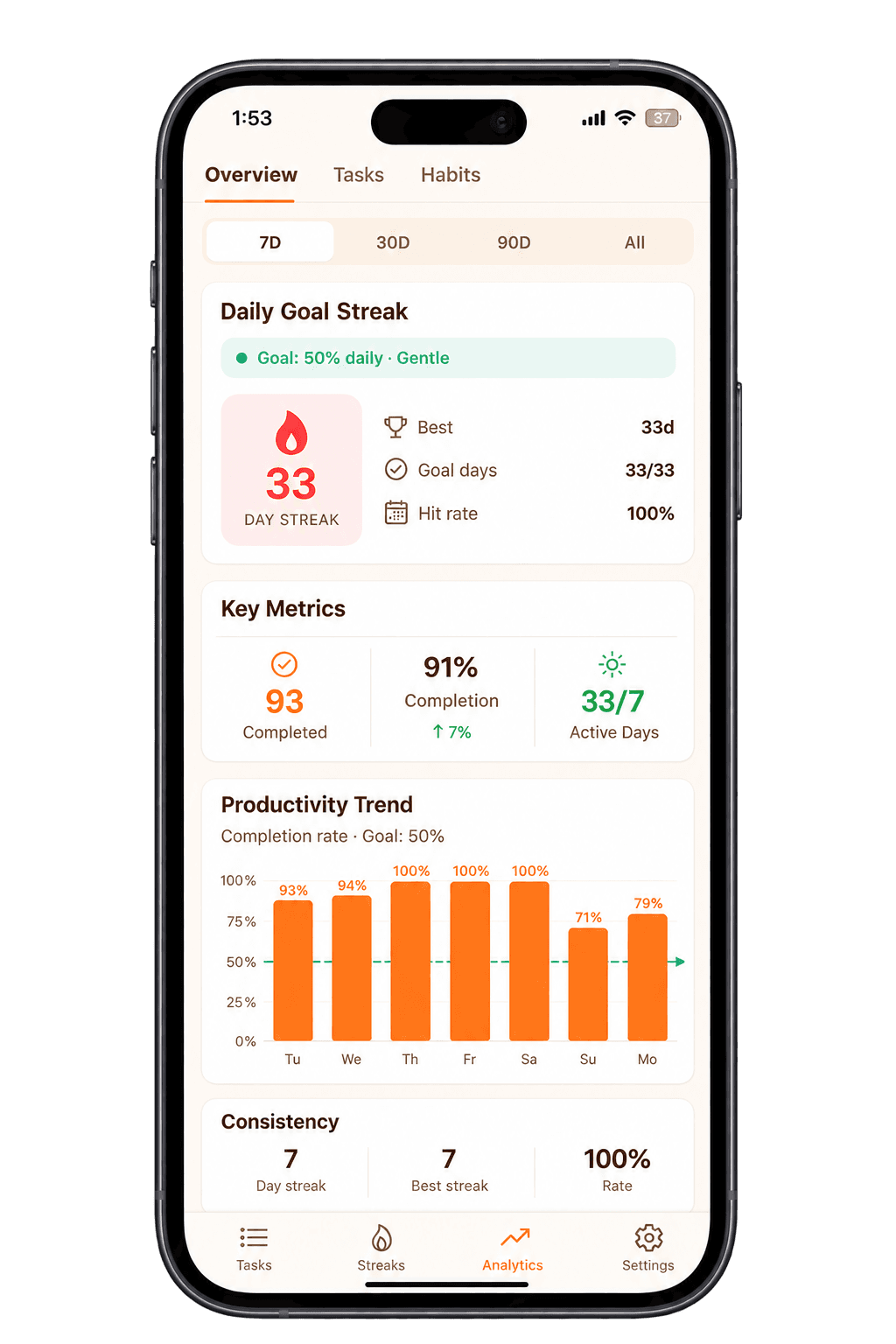
Recurring tasks create consistent opportunities to complete and review work. Taskke's analytics let you see whether your recurring routines are actually sticking — so you can understand your patterns, not just your intentions.
Analytics features include completion trends, daily performance summaries, activity heatmaps, streak history, and priority breakdowns — all based on the tasks you've actually completed.
Recurring Tasks vs One-Time Tasks
Both types of task have their place. Knowing when to use each one helps you build a task list that reflects how your work actually happens.
“Submit project”
Happens once. When it's done, it's done. No need to set a schedule — you create it, complete it, and move on.
Best for:
- Deadlines
- One-off projects
- Single deliverables
- Specific events
“Review project progress”
Happens on a regular schedule. Set it up once and Taskke resets it automatically — so it's always ready when the time comes.
Best for:
- Routines
- Regular reviews
- Repeated responsibilities
- Habits and consistency
Examples of Recurring Tasks
Recurring tasks can cover all kinds of regular responsibilities. Here are some common examples.
| Task | Frequency | Example use |
|---|---|---|
| Exercise | Daily | Personal health routine |
| Study session | Daily | Education & skill building |
| Morning review | Daily | Productivity & planning |
| Weekly planning | Weekly | Productivity & priorities |
| Project review | Weekly | Work & freelance |
| Client follow-up | Weekly | Work responsibilities |
| Review finances | Monthly | Personal organisation |
| Monthly planning | Monthly | Goals & business |
| Subscription check | Monthly | Personal admin |
How Recurring Tasks Work in Taskke
Create a task
Add the responsibility you need to repeat — give it a name and any relevant details.
Choose the recurring schedule
Set the task to repeat daily, weekly, or monthly so it resets automatically.
Add task details
Use priorities, due dates, reminders, or checklists to make the task more useful.
Complete each occurrence
Work through the recurring task as it appears. Check it off when it's done.
Review your consistency
Use analytics and streak tracking to see how regularly you're completing your routines.
Turn Repeated Tasks Into Consistent Routines
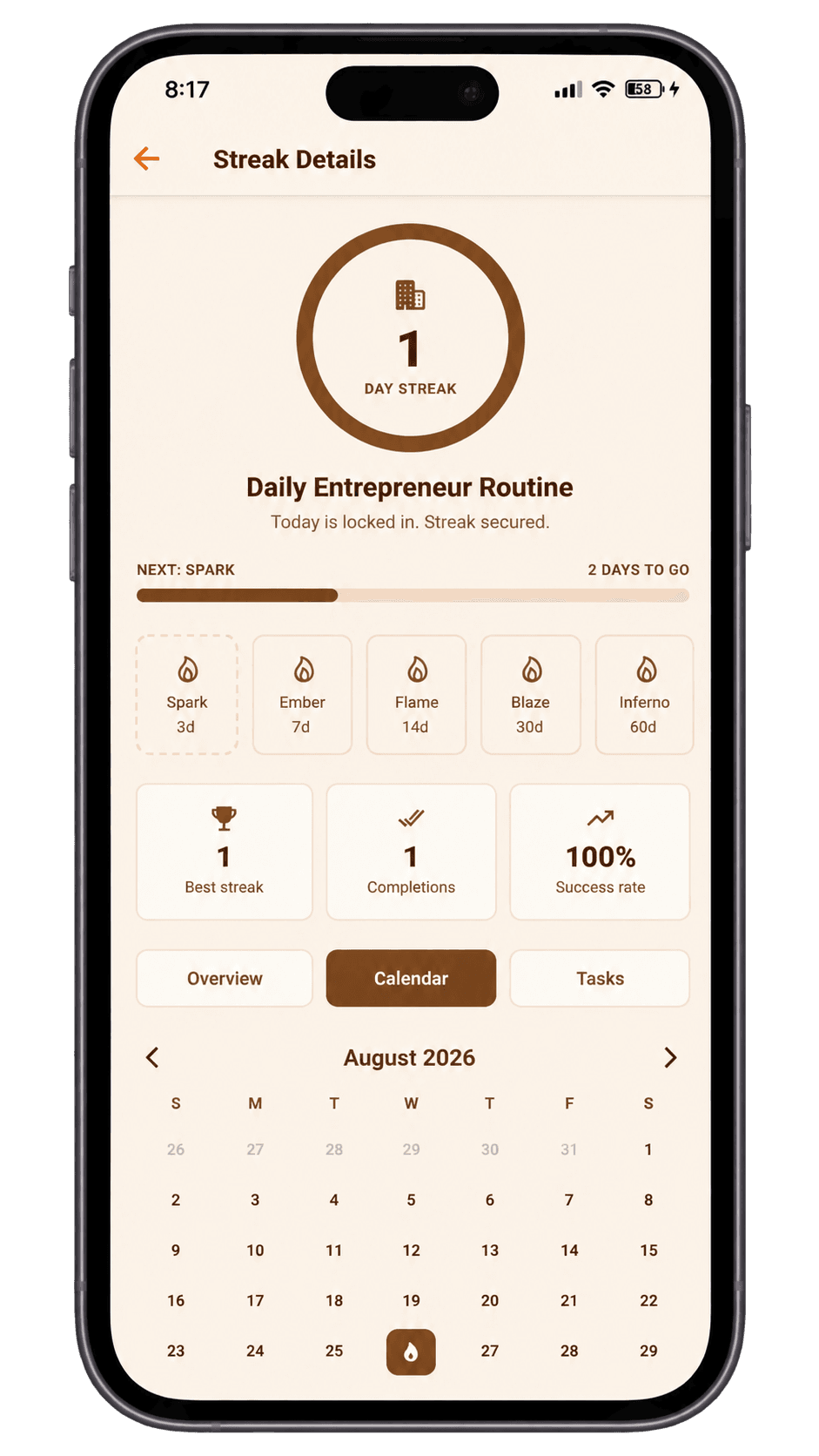
Completing a recurring task regularly builds a pattern. Taskke connects that pattern with streak tracking — so you can see how consistently you're following through on your routines, not just how often you intend to.
For routines built around multiple related tasks, Streak Bundles let you group them into one shared consistency goal. Completing enough of the bundle each day counts as a streak day — without one skipped item resetting the whole thing.
Set a recurring task
Define what needs to happen and how often.
Complete it
Check it off when you've done it.
Repeat the routine
It resets automatically on schedule.
Build consistency
Regular completions grow your streak.
Track your progress
Analytics show how consistently you're following through.
Who Can Benefit From Recurring Tasks?
Recurring tasks are useful for anyone whose work or life includes responsibilities that happen on a regular schedule.
Students
Repeated study sessions, revision routines, reading schedules, and assignment check-ins. Recurring tasks keep study habits visible without extra planning effort.
Freelancers
Weekly client follow-ups, recurring administrative work, invoicing reminders, and regular project tasks. Keep your working rhythm organized without a manual calendar.
Entrepreneurs
Weekly reviews, planning sessions, recurring operational responsibilities, and regular metric checks. Set them up once so they're always part of your workflow.
Professionals
Report prep, meeting routines, regular project reviews, and administrative tasks that happen on a schedule. Recurring tasks remove the mental overhead of remembering them.
Personal routines
Exercise, reading, journaling, meditation, or any personal habit you want to maintain. Recurring tasks give your routines a consistent presence in your task list.
Use Recurring Tasks for Different Routines
- Exercise
- Reading
- Daily planning
- Household tasks
- Journaling
- Revision sessions
- Practice problems
- Assignment prep
- Subject review
- Reading notes
- Weekly reports
- Project reviews
- Client follow-ups
- Admin tasks
- Team check-ins
- Planning sessions
- Metrics review
- Recurring operations
- Monthly reviews
- Goal tracking
Explore More Taskke Features
Recurring
Task
Questions
Common questions about recurring tasks in Taskke. Contact us if yours isn't here.
Recurring tasks are tasks that repeat automatically on a defined schedule, such as daily, weekly, or monthly. Instead of recreating the same task each time, you set it up once and it resets on your chosen frequency.
Yes. Taskke supports daily, weekly, and monthly recurring tasks. Once set, a recurring task resets automatically so you never need to recreate it manually.
Taskke's free plan includes up to 4 daily, 2 weekly, and 2 monthly recurring tasks, plus unlimited one-off tasks. Taskke Pro ($2.99/month or $24/year) makes recurring tasks unlimited, and new users get a 15-day free Pro trial.
Yes. You can set any task to repeat every day. Daily recurring tasks are useful for routines like exercise, study, planning, or any responsibility you want to maintain consistently.
Yes. Taskke supports weekly recurring tasks. Use them for responsibilities that come around on a regular weekly schedule — a planning session, a review, or a routine you maintain once a week.
Yes. A weekly recurring task can repeat on exactly the days you choose — for example Sunday, Thursday, and Friday — so routines like gym days or class days don't need a separate task for each day.
Yes. Taskke supports monthly recurring tasks. These are useful for responsibilities that only happen once a month but still need to stay visible — financial reviews, planning sessions, or household responsibilities.
A one-time task is created, completed, and done — it doesn't repeat. A recurring task resets automatically on a schedule, so it appears again after each completion. Use one-time tasks for specific deliverables and deadlines; use recurring tasks for responsibilities that happen on a regular schedule.
Yes. You can add a reminder to any task in Taskke, including recurring ones. The reminder sends a push notification at your chosen time, so the task is brought to your attention when it matters.
Recurring tasks keep regular responsibilities in your task list automatically, making it easier to maintain routines without manual effort. Whether that consistency becomes a long-term habit depends on how you follow through — Taskke provides the structure and streak tracking to help you see your patterns.
Yes. Completing recurring tasks regularly contributes to streak tracking in Taskke. You can track streaks for individual tasks and see your consistency over time. Streak Bundles (a Taskke Pro feature) let you group multiple recurring tasks into one shared consistency goal.
Yes. Taskke is a free recurring tasks app for Android that supports daily, weekly, and monthly recurring tasks as part of its broader task management features — including a to-do list, task planner, reminders, checklists, streak tracking, and productivity analytics.
Yes. Recurring tasks are useful for any regular responsibility — daily study sessions, weekly project reviews, client follow-ups, or regular work routines. Set them once and they remain part of your workflow on your chosen schedule.
Recurring tasks appear alongside your one-time tasks in Taskke's to-do list. Your task list can include both — one-off tasks for specific deadlines and recurring tasks for regular routines — so everything you need to do is visible in one place.
Make Repeated Tasks Easier to Manage
Schedule your recurring responsibilities, keep your routines organised, and track your consistency with Taskke.